
Every business eventually asks the same question: should we build this on the cloud? For most companies today, that question has already been answered. The real challenge now is building cloud applications that scale when you need them to, stay secure without slowing your team down, and actually deliver a return on the investment.
This guide walks through what cloud application development means, how the process works, what it costs, and what to look for in cloud application development services before you sign with anyone. Whether you’re a founder scoping your first product or a CTO evaluating vendors, this is written to make sense either way.
What Is Cloud Application Development?
Cloud application development is the process of designing, building, and deploying software that runs on cloud infrastructure instead of physical, on-premises servers. Instead of buying and maintaining your own hardware, you use computing power, storage, and networking from a provider like AWS, Microsoft Azure, or Google Cloud and pay for what you actually use.
The bigger difference isn’t where the app lives; it’s how it behaves. A cloud application can add computing resources automatically when traffic spikes, recover on its own if one server fails, and receive updates without taking the whole system offline. A traditional on-premise app usually can’t do any of that without manual intervention, which is exactly why cloud application development is treated as its own discipline rather than just “hosting somewhere else.”
Cloud applications generally take one of these forms:
- Fully cloud-native applications, built from scratch specifically for the cloud
- Hybrid applications, keeping some systems on-premises for compliance or legacy reasons while running others in the cloud
- Modernized legacy applications, where an older system is restructured to take advantage of cloud infrastructure
- SaaS platforms, customer portals, and internal tools, which are usually cloud-native by default
Why Businesses Are Investing in Cloud Application Development
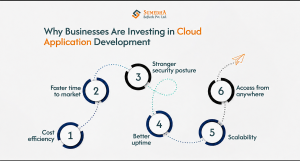
The reasons companies make this move usually come down to a handful of practical, recurring problems the cloud is built to solve.
Scalability
Most businesses can’t predict exactly how much traffic they’ll get next quarter. Cloud infrastructure expands and contracts with actual demand, so a seasonal spike or sudden growth gets handled automatically instead of requiring a scramble to buy more server capacity.
Cost efficiency
Traditional infrastructure has a high upfront cost whether you use it or not. Cloud infrastructure is pay-as-you-go, so your spend tracks your actual usage. The catch: this only pays off with active monitoring, since idle cloud resources still rack up a bill.
Faster time to market
CI/CD pipelines automate testing and deployment, so updates ship in small, low-risk batches instead of one large, high-stakes release. A feature that once took a quarter can often go live in weeks.
Stronger security posture
Cloud providers invest heavily in securing their own infrastructure, more than most individual companies could build alone. But that’s only half the picture. Your team is still responsible for how the application is configured and who has access, which is why security depends on both the provider and your own architecture.
Better uptime
Cloud infrastructure is distributed across multiple servers and locations, so there’s no single point of failure. If one server goes down, traffic shifts elsewhere, and most users never notice.
Access from anywhere
Cloud applications are reachable over the internet, so employees, customers, and partners can securely access them from any location with proper authentication. This matters more than it sounds for remote teams, multi-location businesses, and any company serving customers across different time zones.
Cloud Service Models
These models describe how much infrastructure you manage yourself versus how much the provider handles.
Software as a Service (SaaS)
Fully built applications used over the internet, like Salesforce or Google Workspace. Best when you need a capability fast and have no reason to build it yourself, though you’re limited to what the provider built.
Platform as a Service (PaaS)
A managed environment like Azure App Service, where the provider handles infrastructure and operating systems so your developers focus purely on application logic. Good for custom software development and web development services without the overhead of managing servers, allowing development teams to focus on building innovative applications instead of managing infrastructure.
Infrastructure as a Service (IaaS)
Raw computing resources, servers, storage, and networking are managed by providers like AWS. This gives the most control and is what most custom, enterprise-grade applications are built on, though it demands more in-house expertise.
Choosing a Cloud Deployment Model
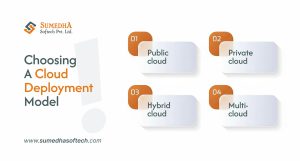
Once you know which service model fits, the next decision is where that application actually lives, and this choice affects cost, compliance, and how much control you keep.
Public cloud is shared infrastructure managed by a provider, fast and affordable to start with. It’s the default for startups, SaaS products, and e-commerce that need to move quickly.
Private cloud dedicates infrastructure to a single organization, giving tighter control over data governance. Industries with strict compliance needs (banking, healthcare, government) tend to prefer it despite the higher cost.
Hybrid cloud keeps sensitive data private while using a public cloud for scale, letting a business meet compliance needs without paying private-cloud prices for everything.
Multi-cloud uses more than one provider (AWS for storage and Google Cloud for AI, for example), reducing dependency on any single vendor and adding resilience if one provider has an outage or changes pricing.
The Cloud Application Development Process
Building a cloud application isn’t one big step; it’s a sequence of decisions that each shape what comes next. Here’s how it typically unfolds:
Define business objectives
Get specific about what the application needs to achieve before any technical decision gets made. Skipping this often means building good technology that solves the wrong problem.
Choose the right cloud platform
AWS, Azure, or Google Cloud, based on your existing stack, compliance needs, and long-term goals.Organizations often rely on cloud consulting services to evaluate these platforms and select the solution that best aligns with their business objectives, security requirements, and budget.
Select a deployment model
Public, private, hybrid, or multi-cloud, depending on data sensitivity and regulation. This is harder to reverse later than most decisions on this list.
Design the architecture
Modern applications favor microservices over one large monolithic codebase, using containers for portability, so one part of the system can scale or update without touching everything else.
Design the user experience
Wireframes and prototypes let a team test the workflow before writing production code. Catching a confusing flow here costs a conversation; catching it after launch costs a rebuild.
Build with the right tech stack
Chosen for what the application needs long-term, not just what the team already knows.
Test rigorously
Load testing, security testing, and QA catch problems while they’re cheap to fix.
Deploy and automate
CI/CD, infrastructure-as-code, and automated rollback turn releases into routine, low-risk events.
Monitor and optimize continuously
A cloud application is never really finished. Performance, security, and cost all drift over time, so the healthy ones have someone actively watching after launch.
Cloud Architecture Best Practices
Two applications can run on the same cloud provider and perform completely differently. The difference usually comes down to a few architectural decisions made early on.
Build cloud-native, not just cloud-hosted. Simply moving an old application onto cloud servers (a “lift and shift”) gets you out of physical hardware maintenance, but misses most of the real benefit. True cloud-native applications use microservices, containers, Kubernetes, and serverless computing where it fits, which is what actually delivers better fault tolerance and faster deployment.
Design for scale from day one. Auto-scaling, load balancing, and distributed databases let an application absorb a sudden spike without falling over. Retrofitting scalability after the fact usually means significant rework, not a quick fix.
Build security in, don’t bolt it on. Encryption, secure APIs, IAM, and multi-factor authentication work best as part of the architecture from the start. Added later, security tends to be reactive, patching specific issues as they’re found instead of closing off whole categories of risk.
The Technology Stack Behind Cloud Applications
The right stack depends on what the application actually needs to do, not what’s trending. Whether you’re building enterprise software or delivering web development services, choosing the right technologies ensures better scalability, security, and long-term maintainability. Here’s what most cloud applications draw from:
| Layer | Common Choices |
| Front-end | React.js, Angular, Vue.js |
| Back-end | Node.js, .NET Core, Java Spring Boot, Python (Django/Flask), PHP Laravel |
| Databases | PostgreSQL, MySQL, MongoDB, Firebase, Amazon DynamoDB |
| Cloud platforms | AWS, Microsoft Azure, Google Cloud Platform |
| DevOps tools | Docker, Kubernetes, Jenkins, GitHub Actions, Terraform |
A relational database like PostgreSQL suits structured data (orders, transactions), while something like MongoDB fits looser, faster-changing data better. There’s no universal “best stack,” only the one that matches your scale, compliance, and maintenance needs.
How to Evaluate Cloud App Development Services
Not every provider offering cloud app development services truly understands cloud-native engineering, and the gap often becomes apparent only after deployment challenges arise. Choosing the right technology partner can significantly impact your application’s scalability, security, and long-term success. Here’s what separates the best providers from the rest:
Cloud-native expertise, not just cloud hosting
The best cloud app development service providers have hands-on experience building cloud-native applications using microservices, serverless computing, and containerized deployments—not just migrating applications to cloud servers. Ask for relevant case studies that demonstrate real cloud-native expertise.
A security-first mindset
A reliable development partner prioritizes security from day one. Evaluate how they approach Identity and Access Management (IAM), data encryption, Zero Trust architecture, compliance, and secure coding practices before discussing application features.
DevOps maturity
Modern cloud app development services should include mature DevOps practices. Ask who manages the CI/CD pipeline, how deployments are automated, and what the incident response process looks like when production issues occur. Clear, structured answers indicate operational maturity.
Comprehensive post-launch support
Cloud applications require continuous monitoring, performance optimization, security updates, and infrastructure scaling after deployment. Ensure your development partner provides a transparent post-launch support model with clearly defined SLAs and maintenance plans.
Multi-cloud or cloud-agnostic expertise
An experienced provider should be capable of building applications across AWS, Microsoft Azure, and Google Cloud Platform. Multi-cloud expertise reduces vendor lock-in, improves flexibility, and gives your business greater control over future infrastructure decisions.
Common Challenges and How to Solve Them
Most challenges in cloud application development trace back to a handful of recurring, avoidable issues rather than anything unusual to a specific project.
Vendor lock-in. Deep dependency on one provider’s proprietary services makes future migration expensive. The fix is architecting with containers and open standards from day one, even on a single cloud.
Security gaps. A large share of enterprise breaches trace back to misconfigured environments rather than sophisticated hacking: an overly open permission, an exposed storage bucket, credentials that were never rotated. Zero-trust architecture and regular audits catch most of these early.
Legacy system integration. Older systems weren’t built to speak the same language as modern cloud applications. API-first design and middleware bridge the two gradually instead of forcing a risky full rebuild.
Cost overruns. Usage-based pricing can quietly grow when resources get provisioned and forgotten. Auto-scaling policies and regular cost reviews keep spending predictable.
Ready to Build Smarter Solutions?
Turn your ideas into scalable digital products with our expert team.
How Much Does Cloud Application Development Cost?
Cost depends on project complexity, number of features, tech stack, integrations, and security requirements. As a rough guide:
| Project Type | Typical Timeline |
| MVP | 2 to 4 months |
| Mid-sized business application | 4 to 8 months |
| Enterprise-grade cloud platform | 8 to 12+ months |
It’s worth resisting the urge to focus purely on the upfront number. A cheaper build that skips proper architecture or security often costs more later in downtime or a rebuild. The better question is the return over time: a well-built cloud application typically lowers infrastructure costs and speeds up how fast new features can ship.
Where Cloud Application Development Is Headed
A few trends are actively shaping how cloud applications get built going into 2026, each solving a specific, practical problem rather than just being a buzzword.
AI Solutions Development
AI Solutions Development is transforming cloud applications by integrating machine learning, predictive analytics, and intelligent automation into business workflows. Organizations can leverage AI-powered cloud solutions to personalize customer experiences, automate repetitive tasks, gain real-time insights, and make faster, data-driven decisions.
Serverless Computing
Serverless computing enables businesses to build and deploy applications without managing servers. By paying only for actual execution time instead of idle infrastructure, organizations can reduce operational costs, improve scalability, and accelerate application development.
Edge Computing
Edge computing processes data closer to where it is generated, reducing latency and improving performance for real-time applications. It is particularly valuable for IoT devices, smart manufacturing, autonomous systems, and applications that require instant data processing.
Multi-Cloud Strategies
Many organizations are adopting multi-cloud strategies to distribute workloads across providers such as AWS, Microsoft Azure, and Google Cloud Platform. This approach improves business continuity, reduces vendor lock-in, strengthens disaster recovery, and helps organizations meet regional compliance requirements.
Green Cloud Computing
Sustainability is becoming a key factor in cloud adoption. Businesses are increasingly partnering with cloud providers that operate energy-efficient data centers and use renewable energy sources, helping reduce their environmental impact while supporting long-term ESG goals.
Frequently Asked Questions
Here are quick answers to the questions people ask most often before starting a cloud application project.
1. What is cloud application development?
The process of designing, building, and deploying software that runs on cloud infrastructure instead of on-premise servers, using computing, storage, and networking on demand.
2. How is it different from traditional software development?
Traditional software is built for one fixed environment and scaled by buying more hardware. Cloud applications are built for distributed infrastructure and continuous updates from the start, so they absorb changing demand automatically.
3. What roles are needed on a cloud application team?
A solution architect, backend and frontend developers, a DevOps engineer, a QA or security specialist, and a project manager to keep everything coordinated.
4. Which cloud platform is best: AWS, Azure, or Google Cloud?
There’s no universal answer. It depends on your existing stack, compliance requirements, and scalability goals. Many companies end up using a hybrid or multi-cloud setup instead of committing to just one.
5. How long does cloud application development take?
A simple MVP can take 2 to 4 months, while an enterprise-grade platform with heavy integrations and compliance needs can take 8 to 12 months or more.
6. Is cloud application development secure enough for enterprise data?
Yes, when done correctly. Providers secure the infrastructure, but the application’s configuration, access management, and encryption remain the development team’s responsibility.
7. Which industries benefit most from cloud application development?
Finance, healthcare, retail, logistics, and SaaS see the most measurable return, largely because each depends on handling variable demand, real-time data, and strict regulatory compliance.
Final Thoughts
The companies getting the most out of cloud application development aren’t necessarily the ones with the biggest budgets. They’re the ones treating it as a shared responsibility across engineering, security, and leadership from the first planning conversation, instead of handing it off to IT as an isolated task.
If you’re evaluating a development partner for your next cloud application, prioritize one whose architecture decisions align with your compliance needs and where your business is headed, not just whoever can start the soonest.